gnmap2csv - Generate a CSV File from Nmap Scan Results
I created this basic script to generate a small report from nmap scan results. It's just a quick-and-dirty bash script that can generate a CSV file from .gnmap files that are produced by nmap scanner. You can either use this for reporting or just to get a quick view of the hosts, open ports and services. It has been quite useful for me for penetration tests that I do.
The following is a sample file I generated from an nmap scan and I opened the CSV in Microsoft Excel.
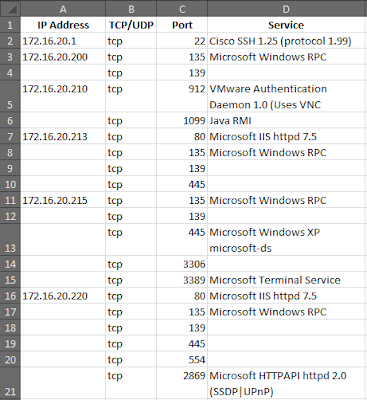
First, you must save scan results in .gnmap format (grepable) with either -oG option or -oA (generate normal, xml and grepable formats), because the script passes these files. Secondly if you want to see the service versions, you must enable service scan using the -sV switch.
The syntax for the script is:
The following is the script:
Copy and paste the above code to a text file named "gnmap2csv" and give save it. Then give execution rights for the script.
Then user the syntax mentioned above to generate the csv file.
The following is a sample file I generated from an nmap scan and I opened the CSV in Microsoft Excel.

First, you must save scan results in .gnmap format (grepable) with either -oG option or -oA (generate normal, xml and grepable formats), because the script passes these files. Secondly if you want to see the service versions, you must enable service scan using the -sV switch.
The syntax for the script is:
./gnmap2csv path-to-the-directory-with-.gnmap-files > output-file-name.csv
The following is the script:
#!/bin/bash
###############################
#  Author: Dharshin De Silva  #
###############################
if [ $# -lt 1 ]
then
  echo "Syntax: ./gnmap2csv direcotory-with-.gnmap-files"
  exit -1
fi

echo "\"IP Address\",\"TCP/UDP\",\"Port\",\"Service\""
cat $1/*.gnmap |  grep '/open/' | sort -u | awk -F'Host: | \(\).+Ports: |, ' '{ printf "%s", $2; first=1; for(i=3; i < NR; i++) { split($i,a,"/"); if(a[2]=="open") { if(first==0) { print""; } printf ",%s,%s,%s",a[3],a[1],a[7]; first=0; } } print""; }'
Copy and paste the above code to a text file named "gnmap2csv" and give save it. Then give execution rights for the script.
chmod +x gnmap2csv
Then user the syntax mentioned above to generate the csv file.

hi, thx for your work...but when i try to execute the script, it has an output like that:
ReplyDelete./gnmap2csv.sh: line 14: unexpected EOF while looking for matching `"'
./gnmap2csv.sh: line 15: syntax error: unexpected end of file
@poderot: You might be missing a quote/double quote or a back tick.
ReplyDeleteanyone get this working ?
ReplyDeleteReplace:
ReplyDeleteecho "Syntax: ./gnmap2csv direcotory-with-.gnmap-files
With:
echo "Syntax: ./gnmap2csv direcotory-with-.gnmap-files" #<-- Missing double-quote
Thanks for pointing that out. I have corrected it in the script
ReplyDeleteHi,
ReplyDeleteWhen I m trying to execute the script as such, there is a problem in the producing the csv file in the desired form. One column has the hosts whereas the ports etc come clustered in another column.
I m obtaining my gnmap output using zenmap.
The warnings on running the script are:
1)\( being considered as only (
2)\' being considered as only '
Kindly help as I have to submit my term proj on Tue in which I have to redirect nmap o/p to a csv file.
Thanks in advance,
Amrita